


By Matt Wampler, CEO of ClearCOGS
Quick answer: A restaurant prep sheet should list each item, the unit you make it in, a build-to quantity for the day, what’s usable on hand, and how much to prep (build-to minus on hand, rounded up to a whole batch). Most sheets stop there. The best ones add three columns filled in after service: how much was actually made, what time it ran out, and how much was left at close. Those columns are what let the sheet get more accurate every week. Our free template below includes all of them.
Free download: Restaurant Prep Sheet Template
A ready-to-use Excel sheet with a daily prep sheet that calculates “prep now” for you, plus a weekly review tab that shows which items are over-prepped and which keep running out.
The prep sheet a school cafeteria keeps
Here’s something many operators have never seen. Schools in the federal school lunch and breakfast programs are required to keep daily production records for the meals they serve (Connecticut State Department of Education).
It’s basically a prep sheet, and it’s more complete than many restaurant prep sheets. Wisconsin’s official instructions ask staff to record the planned number of servings and, if the kitchen made a different amount, the actual number too. Their example: if 200 servings of pizza were planned but more students ate than expected and the kitchen made 225, write “200/225.” Then, after service, staff record leftovers by measuring, weighing or counting (Wisconsin Department of Public Instruction).
The reason matters more than the rule. Connecticut’s guidance points out that past production records help schools forecast trends, plan future menus and control waste.
A prep sheet that only says what to make is a to-do list. One that records what happened is a feedback loop.
Most restaurant prep sheets are to-do lists. They tell the morning crew what to make, then go in the trash. Nobody writes down whether the number was right, so tomorrow’s sheet is built on the same guess as today’s.
What should a restaurant prep sheet include?
Ten columns cover it. The first six are filled in before service. The last four are what make the sheet smarter over time.
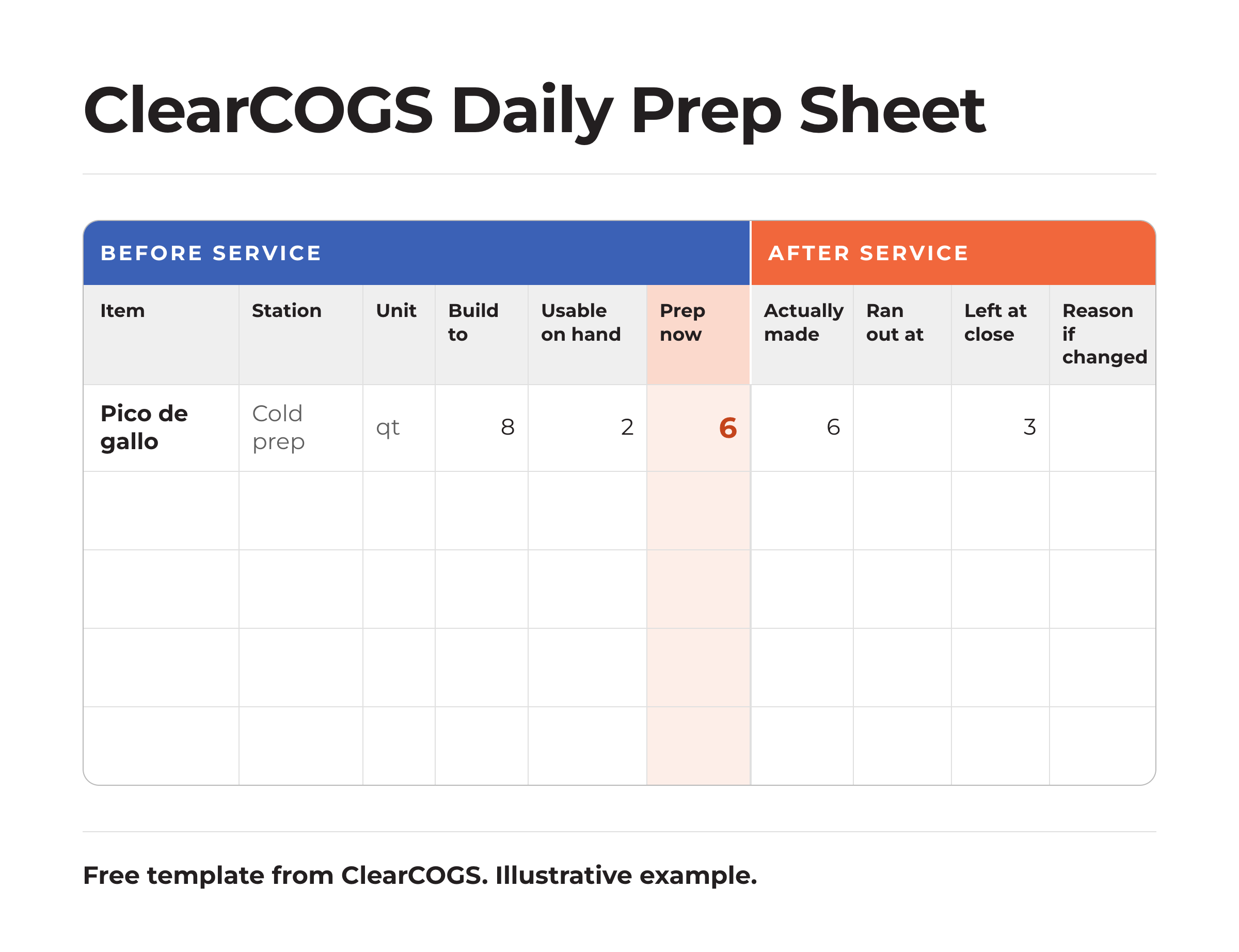
Don’t skip the tenth column. When someone makes a different amount than the sheet says, the reason is the only way to tell a smart call from a guess later. We wrote a whole piece on when a manager should override the forecast.
How do you calculate how much to prep?
rounded up to the next whole unit you actually make
If the build-to for pico de gallo is 8 quarts and there are 2 usable quarts in the walk-in, prep 6. If you make it in 2-quart batches and the math says 5, you’ll make 6, because nobody makes half a batch.
The subtraction is easy. The build-to number is the hard part. It should come from what you expect to sell that day, which changes with the day of the week, the weather, local events and promotions. A single fixed number for every day is a par level, and we’ve written about why par levels fail on the days that matter most. If you don’t have a forecast yet, start with the average of the same weekday over the last few weeks, then let the after-service columns correct it.
How to build a prep sheet in 7 steps
- List every item you prep ahead, grouped by station and in the order the crew should make them. Long-lead items like braises and doughs go first.
- Set the unit to how the kitchen really makes it. Pans, quarts, batches or trays. If you count in one unit and make in another, the sheet will always be off.
- Set a build-to for each item, for each day of the week. Monday and Saturday shouldn’t share a number.
- Count usable on hand every morning. Only count product that’s in date and good enough to serve.
- Let the sheet calculate “prep now.” Our template does this automatically.
- Fill in the after-service columns at close: what was made, what time anything ran out, and what was left.
- Review once a week, item by item, and adjust the build-to numbers. This is the step almost everyone skips, and it’s where the savings come from.
Example: one week of pico de gallo
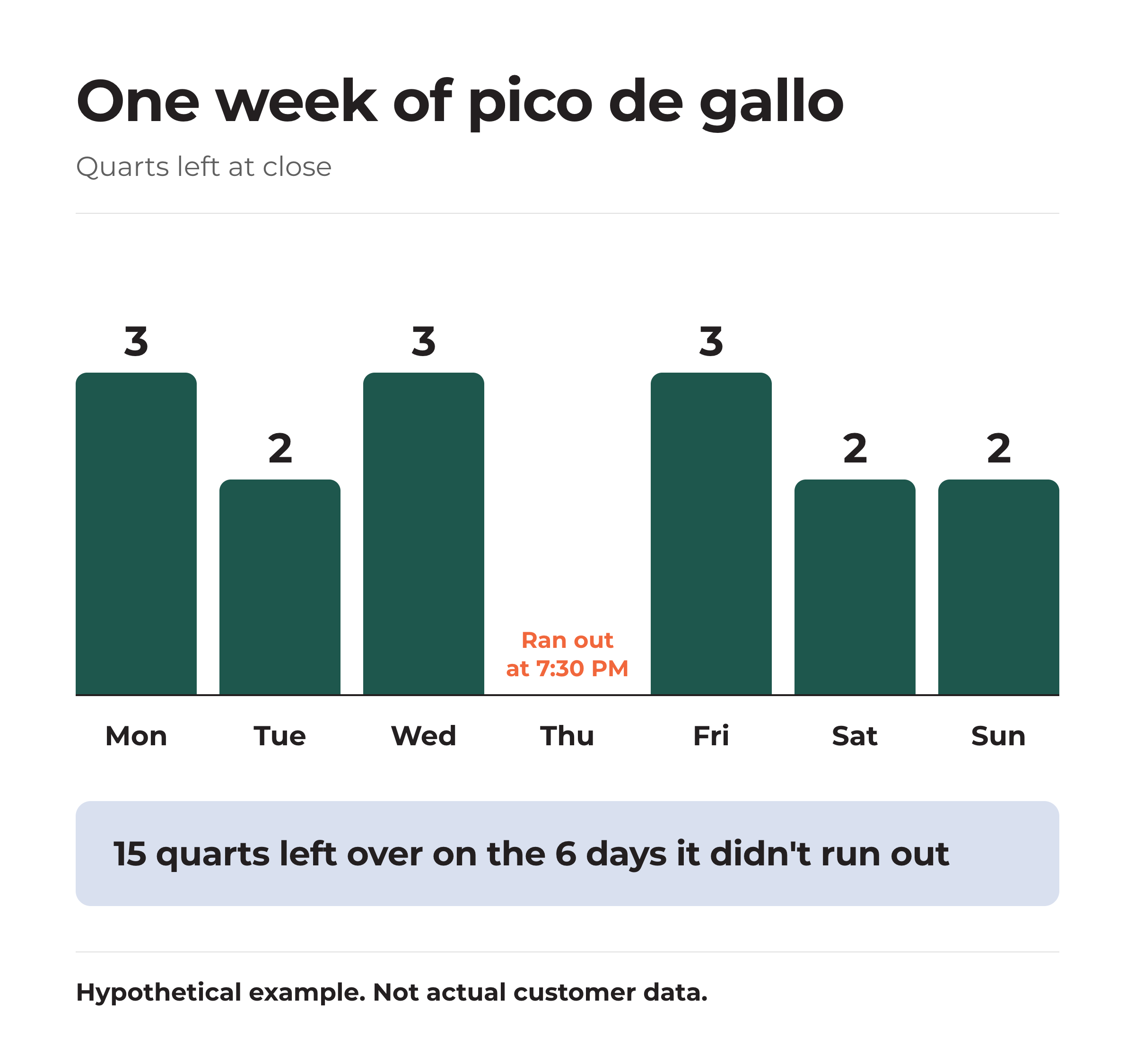
Here’s what the weekly review shows for one item at one location. This is a hypothetical example to show how it works.
Left at close
3, 2, 3, 0, 3, 2, 2
Quarts, Monday to Sunday
Ran out
Thu, 7:30 PM
The only day it ran short
Hypothetical example.
Two things jump out.
First, on the six days it didn’t run out, the kitchen threw away 15 quarts, an average of 2.5 a day. At an assumed $5 per quart in ingredients and prep time, that’s $75 a week, or about $3,900 a year for one item at one location. Across 20 locations, it’s roughly $78,000. Lowering the build-to by 2 quarts on those days would recover most of it.
Second, Thursday’s zero isn’t a good day. It ran out at 7:30, so guests who wanted it late got nothing, and the real demand that day was higher than what the kitchen sold. The right move is the opposite of the other days: raise Thursday’s build-to a little, or add a small second batch in the afternoon.
Watch out: a zero at close
Nothing left at close looks perfect, but it often means you ran out. Always check the “ran out at” column before lowering a build-to based on a day with zero left.
The same prep sheet looks different from each seat
From finance: where’s the money?
In the “left at close” column. Multiply each item’s average leftover by its cost and you have a weekly waste number by item, which most P&Ls never show. The pico example above is one item. A typical kitchen preps dozens.
From operations: is this more paperwork?
Three extra numbers per item at close: made, ran out at, left over. That’s a couple of minutes. In return, the morning sheet gets more accurate every week, which saves the morning crew from guessing and the closing crew from throwing food away.
From IT and data: what can we automate?
Most of it. Build-to numbers can come straight from a forecast, “prep now” is a formula, and sales data from the POS can show when an item stopped selling, which is often a clue it ran out. The part that still needs a person is the count of what’s usable on hand. If you’re wondering how accurate that count needs to be, we’ve written about whether inventory counts are required to forecast prep.
From franchise leadership: should every location use the same sheet?
The same columns, yes. The same items and numbers, no. Standard columns let you compare locations on leftovers and stockouts. Each location still needs its own build-to numbers, because two stores with the same menu rarely sell the same mix.
Paper, spreadsheet or software?
All three can work. Paper is fast but hard to review. A spreadsheet, like our template, makes the weekly review easy and is free. Software makes sense once you have more items and locations than one person can review in an hour a week, because it can set the build-to numbers from a forecast and spot the patterns for you. Whatever you use, the after-service columns are what matter.
For definitions of the terms used here, see our demand forecasting terms guide. And with ingredient prices rising unevenly this year, leftovers cost more than they used to, as we covered in what’s happening with 2026 food costs.
Frequently asked questions
What is a prep sheet in a restaurant?
A prep sheet is a daily list of the items a kitchen needs to prepare before service, with how much of each to make. A good one also records what was actually made, when items ran out and what was left at close.
How do you calculate how much to prep?
Subtract the usable amount you already have on hand from the build-to quantity for the day, then round up to the next whole unit you make, such as a full pan or batch.
What is a build-to number?
It’s the amount of an item you want ready for the day or shift. It should change by day of the week and with expected sales, rather than staying fixed.
How often should a prep sheet be updated?
Fill it in every day before and after service, and review the build-to numbers at least once a week using the leftover and stockout columns.
Is there a free restaurant prep sheet template?
Yes. The ClearCOGS template linked above is a free Excel file with a daily prep sheet that calculates how much to prep and a weekly review tab.
Why should a prep sheet track leftovers?
Because leftovers show which build-to numbers are too high. School meal programs record leftovers too, and their guidance notes that past records help forecast trends and control waste.
The bottom line
A prep sheet is the one document every kitchen already fills out every day. Add three numbers at close, look at them once a week, and it stops being a to-do list and starts telling you where your waste and your stockouts are.
This is the work we spend our days on at ClearCOGS: turning sales history into a daily prep plan for each location, so the amount made matches the amount likely to sell, item by item.
Start with one week
Download the template, fill in the after-service columns for seven days, and run the weekly review. If you’d like help turning it into a daily prep plan that updates itself, we’re happy to walk through it with you.
About the author
Matt Wampler is the CEO and Co-Founder of ClearCOGS. Before founding the company, he ran Jimmy John’s franchise restaurants in the Washington, D.C. suburbs, where every morning started with deciding how much to prep. He hosts the Restaurant AI Podcast.
Disclosure and methodology
ClearCOGS sells prep forecasting software, so we have a commercial interest in how kitchens plan prep. The template is free to use and adapt. School meal production record requirements come from the Wisconsin Department of Public Instruction (instructions dated March 2026) and the Connecticut State Department of Education; school meal programs differ from restaurants, and we cite them as an example of good record-keeping, not as a rule for restaurants. The pico de gallo example uses hypothetical numbers, labeled as such; substitute your own items and costs. Last reviewed: October 2026.
Sources
- Wisconsin Department of Public Instruction. Instructions: Production Records for Breakfast and Lunch. March 2026. dpi.state.wi.us
- Connecticut State Department of Education. Production Records for School Nutrition Programs. portal.ct.gov