

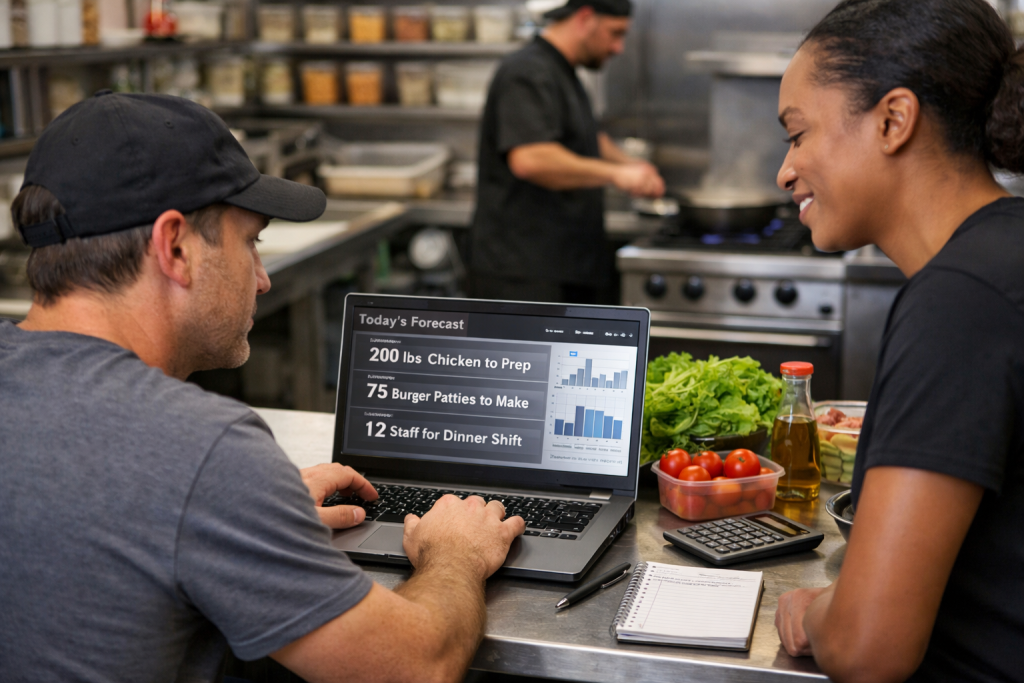



Restaurant forecasting software is a technology platform that analyzes historical sales data, local events, weather, and operational patterns to predict future demand at your restaurant. It tells your team how much to prep, how much to order, and how many people to schedule, before the rush hits. Instead of relying on gut instinct or yesterday’s numbers, your managers get data-backed guidance every single day.
Why Restaurant Operators Are Paying Attention
For years, forecasting meant a manager looking at last Tuesday’s sales and making their best guess. That approach works until it doesn’t, and in a business where food cost and labor cost are your two biggest line items, “best guess” is an expensive habit.
Modern restaurant forecasting software changes that equation entirely.
What is ClearCOGS?
ClearCOGS is an AI-powered restaurant intelligence platform built specifically for multi-unit operators in fast-casual and QSR segments. It ingests your POS data, learns your restaurant’s unique demand patterns, and delivers daily prescriptive recommendations on prep quantities, ordering, and staffing directly to your managers. ClearCOGS doesn’t just show you what happened; it tells you what to do next. Operators using ClearCOGS typically see 15 to 25% reductions in food waste and 2 to 3% margin improvements within the first few months.
How Restaurant Forecasting Software Actually Work
Here is what happens under the hood, explained the way your kitchen manager would want to hear it:
- Data ingestion. The software connects to your POS system and pulls historical transaction data, including sales by item, time of day, day of week, and season.
- Pattern recognition. AI models identify demand patterns specific to your locations, factoring in variables like local events, holidays, and even weather forecasts.
- Demand prediction. The system generates a sales forecast for the day, week, or period ahead, broken down by daypart and menu category.
- Prescriptive recommendations. Rather than handing you a spreadsheet, the software converts that forecast into actionable prep guides, order quantities, and staffing targets.
- Feedback loop. As your team executes and actual sales come in, the model refines itself, getting smarter with every shift.
A Day in the Life: What This Looks Like for Your Manager
It is 6:00 AM. Your opening manager walks in. Instead of flipping through a legal pad or pulling up a spreadsheet on a shared tablet, they open the ClearCOGS dashboard and see exactly how many pounds of chicken to pull from the walk-in, how many sandwich builds to stage, and whether tonight’s dinner rush is projected to run 12% higher than last Thursday because there is a home game across town.
That manager does not need five years of experience to make a smart call. The system gives them the structure to operate like a veteran from day one.
What Restaurant Forecasting Software Covers
Good forecasting software does not just predict sales. It provides operational guidance across multiple areas:
- Food prep forecasting: How much of each item to prep by daypart
- Inventory and ordering: Suggested order quantities based on projected demand and current on-hand
- Labor scheduling: Recommended staffing levels tied to anticipated volume
- Waste tracking: Visibility into over-prep trends so you can tighten production over time
- Menu item performance: Which items drive volume and which inflate your waste numbers
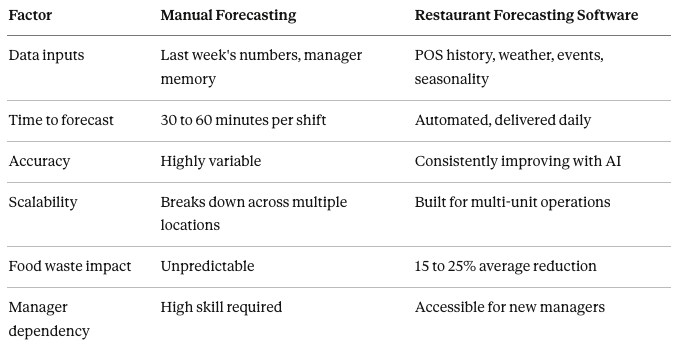
Manual Forecasting vs. Software Forecasting: A Comparison
Pros and Cons of Restaurant Forecasting Software
Pros:
- Reduces food waste and food cost meaningfully
- Frees managers from manual prep calculation
- Creates consistency across multiple locations
- Improves labor efficiency without sacrificing coverage
- Gives operators system-wide visibility from a single dashboard
- Enables data-driven conversations with vendors and ownership
Cons:
- Requires clean, consistent POS data to perform well
- Initial setup and integration takes time
- Teams need brief onboarding to adopt new workflows
- Highly seasonal or event-driven concepts may need model tuning early on
What to Look for in Restaurant Forecasting Software
Not all forecasting tools are built the same. Here is a checklist to evaluate platforms before you commit:
- Integrates directly with your existing POS system
- Provides item-level prep recommendations, not just revenue forecasts
- Accounts for local events, weather, and seasonality
- Scales across multiple locations from a single interface
- Delivers daily, actionable output your managers can use immediately
- Includes waste tracking and feedback loops to improve over time
- Backed by a support team with restaurant operations experience
- Offers transparent reporting on forecast accuracy
Key Takeaway
Restaurant forecasting software turns your historical data into a daily operations playbook. It reduces waste, improves margins, and removes the guesswork that costs operators money every single week. For multi-unit operators especially, it is the difference between reacting to what happened and preparing for what is coming.
Frequently Asked Questions
What kind of restaurants benefit most from forecasting software? Fast-casual and QSR operators with multiple locations see the strongest results because the software scales well and the prep-heavy nature of those concepts makes accurate forecasting especially valuable. Single-unit operators can benefit too, particularly if they are volume-driven or experience significant seasonal swings.
How long does it take to see results? Most ClearCOGS operators report measurable reductions in food waste and prep over-production within the first 30 to 60 days, as the AI model learns demand patterns specific to each location.
Does forecasting software replace my managers? No. It makes your managers more effective by handling the analytical work so they can focus on team leadership, guest experience, and execution. Think of it as giving your manager a highly accurate prep sheet every morning instead of asking them to calculate it themselves.
What data does the software need to get started? Primarily your POS transaction history. Most platforms, including ClearCOGS, can begin generating useful forecasts with as little as 90 days of historical data, though more history improves accuracy.
How is restaurant forecasting software different from a POS report? A POS report shows you what already happened. Forecasting software takes that historical data and tells you what is likely to happen next, with specific operational recommendations attached.
Is forecasting software worth the cost? For most multi-unit operators, the ROI is clear. A 2 to 3% improvement in food cost margin at a restaurant doing $1.5 million in annual revenue is $30,000 to $45,000 in recovered profit per location. The software typically pays for itself well within the first year.


